 Superposer
Coming soon · Free beta · Apple silicon Macs
Your Windows games, superposed on your Mac.
Install and play them right in the Mac Steam app you already use.
Superposer sets everything up for you, tests games on your own Mac instead of guessing, and records every change it makes so you can undo it.
Works with Steam. Not affiliated with or endorsed by Valve or Apple. See how it works.
What Superposer is
A native Mac app that lets you play the Windows games you own on Steam, from the Steam app you already use.
Pick a Windows-only game in Steam, press Install, then Play. Superposer prepares everything the game needs, runs it on your Apple silicon Mac, and gives you the tools to make it look and run well: upscaling, a frame cap, HDR, a performance HUD, an in-game overlay and controller support.
Your Steam library, cloud saves, achievements and playtime stay exactly where they are. There is no second store, no second Steam and no second login.
It is built around three promises. You know before you play, because games are tested on your Mac. You stay in control, because every change can be undone. Your Mac stays tidy, because each game has its own environment and Superposer cleans up after itself.
Why it's better
Running Windows games on a Mac has meant a second Steam, a folder of bottles, config files and guesswork. Superposer is built to remove each of those chores. Cards marked Preview are built and in the beta, and are still being verified in more games, so details may change.
One Steam, no bottle
Install, play and update Windows games in the Mac Steam app itself. There is no second Steam to sign in to and no bottle to maintain. Cloud saves, achievements and playtime come along, and Steam keeps updating itself, because Superposer changes none of Steam's program files.
Tested, not guessed
One click runs a hidden test of a game on your own Mac, without taking over your screen, or tests your whole library at once. Every game shows a verdict with the evidence behind it, and the Compatibility list shows which games we have run, with which graphics layer and when.
Undo anything
Every change Superposer makes outside its own folders is recorded with an undo, for one game or for the whole app. Uninstalling leaves no trace, apart from Steam's own caches. You can see the list at any time under Changes to Your Mac.
A compositor in every game
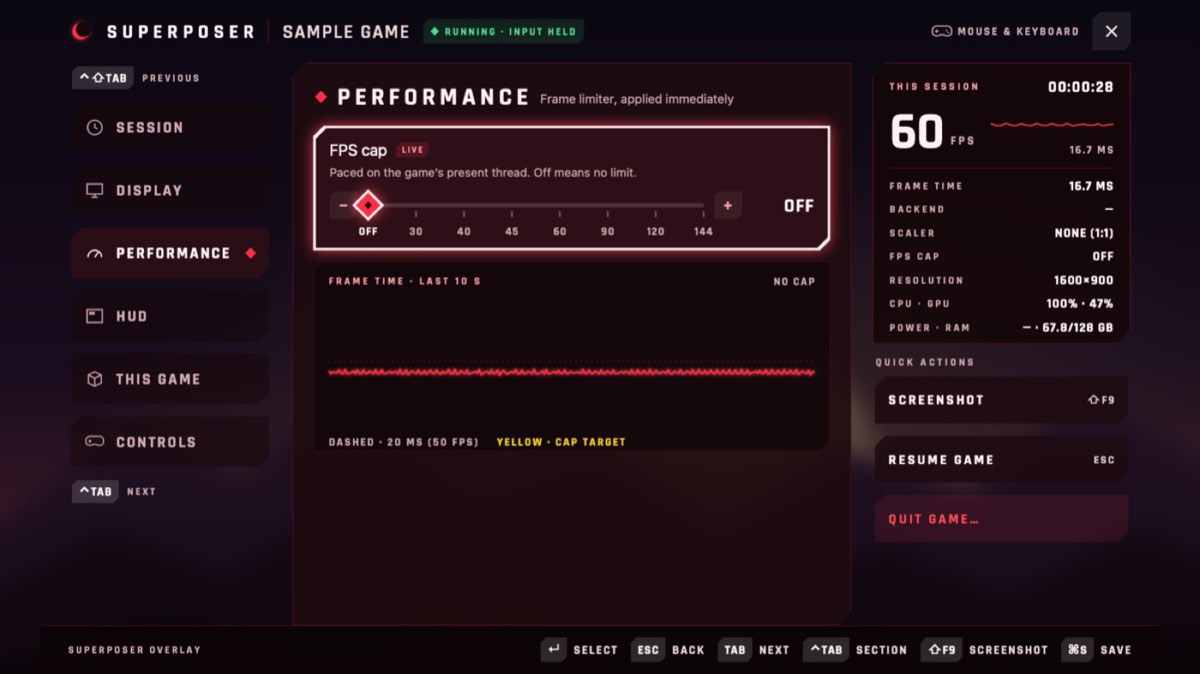
MetalFX upscaling, HDR that rolls off into your display's headroom, a frame cap paced to your screen, screenshots and an in-game panel, with a switch for each game instead of config files. It works in Windows games and, where it is safe, in Mac games. Where code can't be loaded into a game, capture mode does the same by capturing its window.
A HUD and overlay that show why
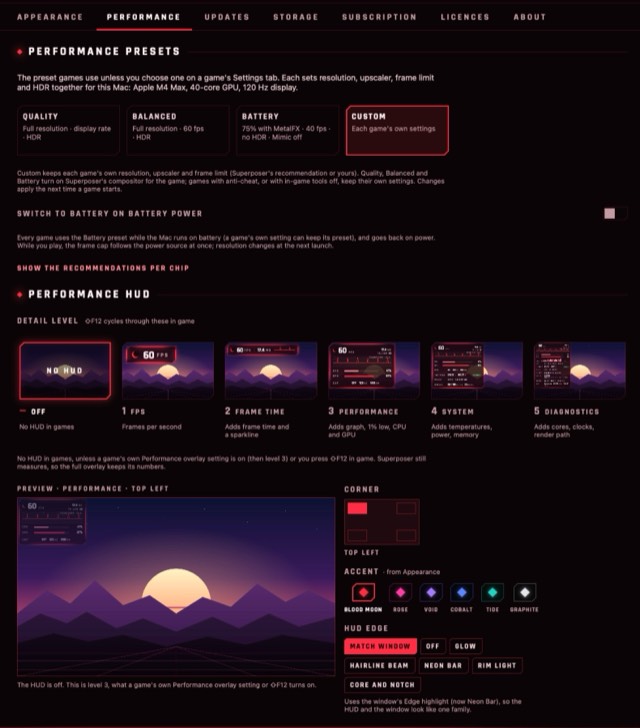
Five HUD levels, from a plain FPS counter to CPU and GPU temperatures, power and clocks, with no cost when it's off. A full in-game overlay, drawn in your accent colour, lets you change settings without leaving the game, and you can drive it with a controller.
Controllers that just work
Xbox, PlayStation and Switch pads work with Steam Input settings on, reconnect when they drop and handle two of the same pad in local co-op. Remap any button per game, see your pad's battery in the overlay, set dead zones and layouts per game, and get the light bar on DualSense and DualShock 4 pads.
Presets that fit your Mac
Quality, Balanced and Battery presets set resolution, upscaler, frame cap and HDR together for your chip and display. Switch to Battery automatically when you unplug, and back when you plug in. Or keep each game's own settings.
Storage that looks after itself
Each game has its own Windows environment, so removing a game gives back its space and touches no other game. Old runtimes and caches are pruned automatically, keeping whatever your games still use, and Settings › Storage shows what is kept and why.
Save backups
Versions of each game's saves are kept after every session and before anything risky, with a preview of what a restore would change. A bad save, a broken update or an experiment can't cost you your progress, including in games without Steam Cloud.
Switching is painless
Superposer finds what you set up elsewhere and brings your Steam games and their saves over without a re-download. Your other setup keeps working, so trying Superposer costs you nothing.
Everything included
Its own Windows runtime and graphics layers, installed by the app on first launch: no Terminal, no Homebrew and no other licence to buy. Games you buy later are set up before they install, so Mac versions stay native and Windows-only games get Superposer.
Private by design
Your library, saves and settings stay on your Mac. There is no telemetry by default. Problem reports are never sent for you: you see exactly what is in one, with your name and paths removed, and choose where it goes. This website has no cookies or trackers.
Everything in the box
The same list is under Settings › About in the app. Cards marked Preview are built and still being verified in more games, and may change.
One Steam, no bottle
Install and play Windows games in the Mac Steam app itself. No second Steam to log in to; cloud saves, achievements and playtime come along.
Tested, not guessed
One-click hidden tests check that a game launches and renders on your Mac, without taking over your screen. Or test your whole library at once.
Undo anything
Every change Superposer makes to your Mac is recorded with an undo. Uninstalling leaves no trace, apart from Steam's own caches.
A compositor in every game
MetalFX upscaling, HDR, a frame cap, an in-game panel and screenshots, with a switch per game. In Windows games, and in Mac games where it's safe.
Play
Everything included
Its own Windows runtime, installed by the app: no Terminal, no Homebrew, no other licence to buy.
Steam features come along
Achievements, cloud saves and playtime work with the Mac Steam client you're signed in to.
Mac versions stay native
Games you buy later are set up before they install: Mac versions install natively, Windows-only games get Superposer.
Cutscenes play
Intros and cutscenes in H.264, HEVC and AAC play, decoded by Apple's own frameworks.
Fast first launch
Each game's Windows environment is cloned from a ready template, so setting one up takes about a second.
Look & performance
Sharper at any size
Render lower and upscale with Apple's MetalFX for more frames, or downscale to a window with a clean area filter.
A frame cap that holds
Paced to your display, ProMotion included, and steady within 2%: cooler, quieter, smoother play.
HDR tuned to your display
HDR games keep their format, and highlights roll off into the headroom your screen has right now.
Works with protected games
Where code can't be loaded into a game, Superposer captures its window instead, so upscaling and screenshots still work. It never bypasses anti-cheat.
A HUD that shows why
Five HUD levels, from FPS to CPU and GPU temperatures, power and clocks, with no cost when it's off.
A real window, any resolution
Pick a resolution and the game plays in a normal Mac window that moves, resizes and lets go of your mouse.

Confidence
Will it work? With evidence
A verdict for each game with the evidence behind it, and a Compatibility list of every game we've tested, with your own results beside ours.
Fixes ready to go
Per-game fixes for known games, and a drafted setup for the rest based on their engine and graphics API.
The right version for each game
Keep a game on the runtime and D3DMetal version that suit it, with its test result on each, and turn on what it needs: DLSS upscaling, AVX, high resolution, the Metal HUD.
Safe problem reports
See exactly what a report would send, with your name and paths removed. Nothing goes without your OK.
Your Mac stays clean
One game, one environment
Each game has its own Windows environment, so one can't break another, and removing it gives back only its space.
Cleans up after itself
Old runtimes and caches are pruned automatically, keeping whatever your games still use.
Polish
A real Mac app
Native and lightweight: no Electron, no virtual machine.
Make it yours
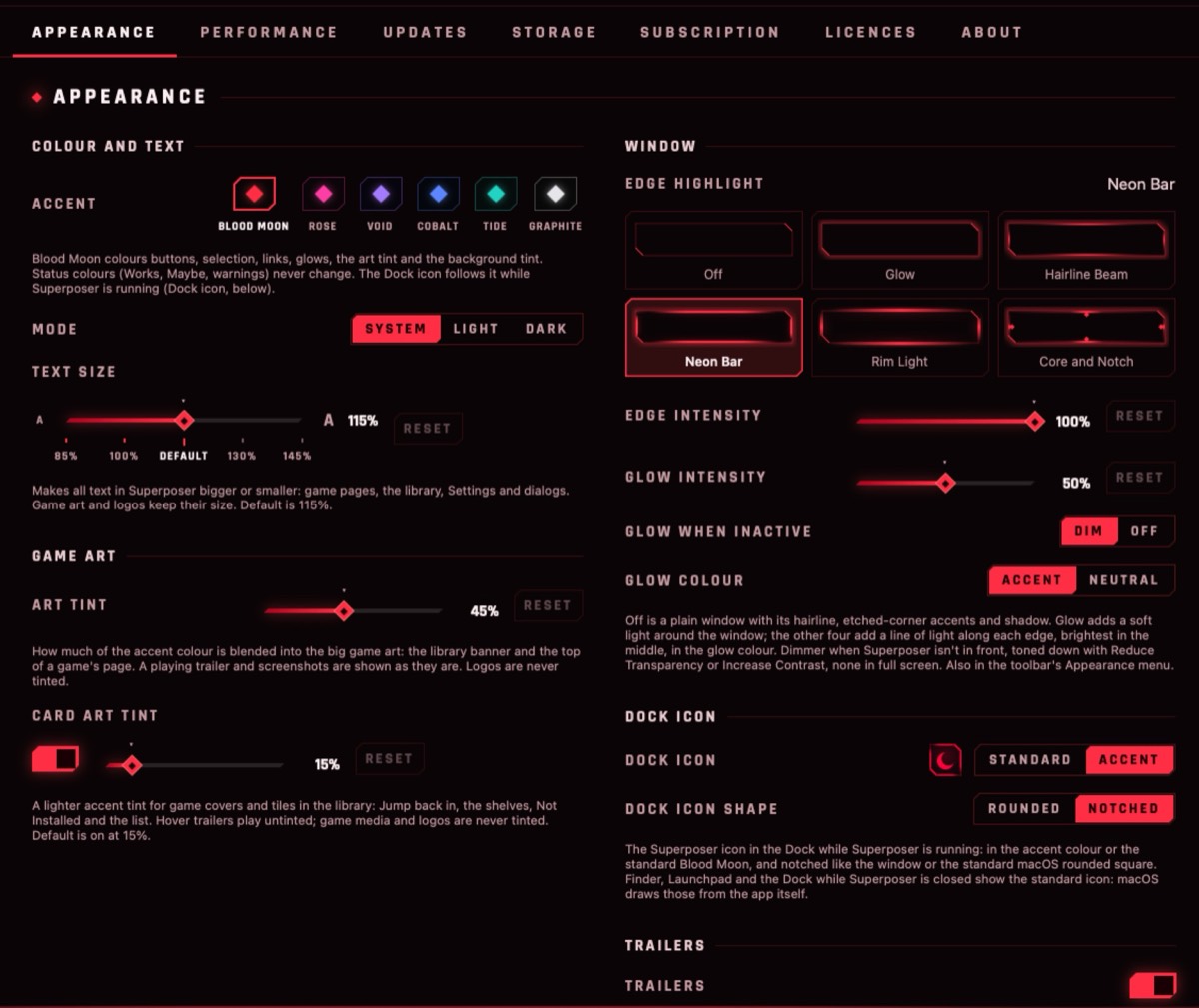
A game-library look with six accent colours, light and dark, and adjustable text size.
Trailers and media
Trailers, screenshots and a media ribbon for the games in your library.
You see it start
From Play to the first frame, the game's art shows it's on its way, even when a game takes a while.
Games that work
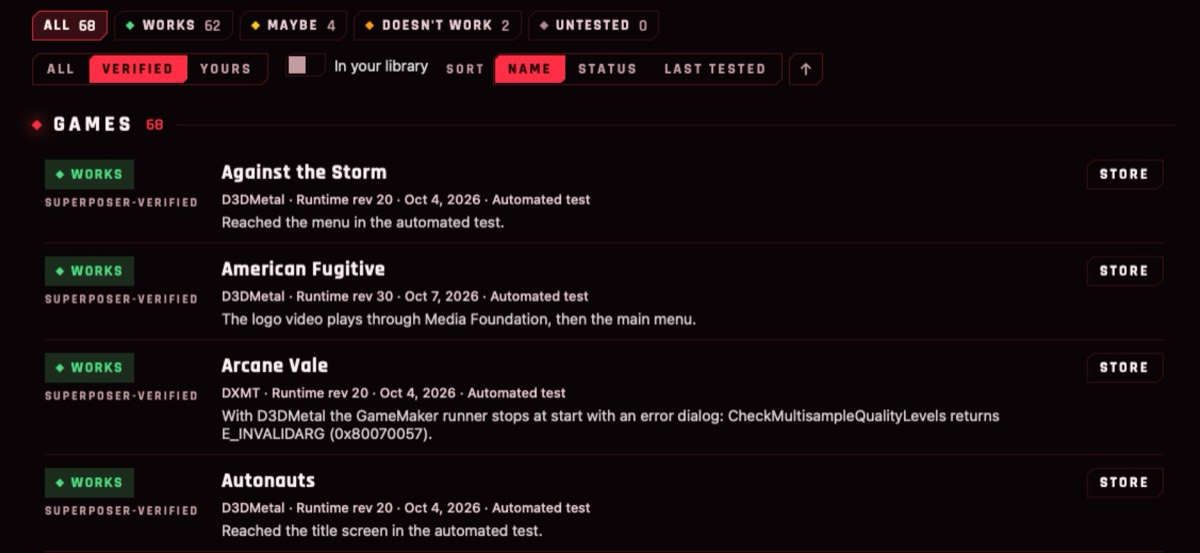
62 games have passed Superposer's own test on a Mac so far: it launched them, rendered them and reached the menu or the game. The list comes from the one inside the app, updated Oct 7, 2026.
- Against the Storm
- American Fugitive
- Arcane Vale
- Autonauts
- Banished
- Brothers - A Tale of Two Sons
- Clanfolk
- Cleared Hot
- Core Keeper
- Darfall
- Dark Deity
- Deep Rock Galactic
- Democracy 4
- Dwarf Fortress
- Dyson Sphere Program
- Everhood
- Everwind
- Fae Tactics
- Going Medieval
- Going Under
- Good Night, Knight
- Guacamelee! 2
- Hero's Hour
- Hexologic
- House of the Dying Sun
- How to Fish
- Mega Man Legacy Collection
- Monster Train
- Moving Out
- Necrosmith
- NecroWorm
- NGU IDLE
- Noita
- Norland
- Nova Lands
- Ocean's Heart
- Overcooked
- Plan B: Terraform
- PlateUp!
- Potion Craft: Alchemist Simulator
- Production Line
- Pumpkin Jack
- Rogue Station
- Romestead
- Serin Fate
- Shortest Trip to Earth
- SteamWorld Build
- Sword of the Necromancer
- Swords and Soldiers 2 Shawarmageddon
- Symphony of War: The Nephilim Saga
- SYNTHETIK
- System Shock: Enhanced Edition
- Tales of the Neon Sea
- Terra Invicta
- The Last Campfire
- The Survivalists
- Travellers Rest
- Urbek City Builder
- Welcome to Elderfield
- Wizard with a Gun
- Yoku's Island Express
- Zombie Cure Lab
Game titles are listed as text only, to say which games we have run. All game names and trademarks belong to their owners, and Superposer is not affiliated with or endorsed by them or their publishers.
How it works
Superposer works with the Steam library you already have. There is no second store, no second Steam and no second login.
- Open Superposer. On first launch it installs what it brings with it: its own Windows runtime (built from the open-source Wine project), Apple's D3DMetal graphics layer, the Steam bridge and the other graphics backends. It takes well under a minute, with nothing to download separately and no Terminal.
- Follow the setup assistant. It shows exactly what each step will change on your Mac before it does anything, and records every change in a journal so it can be undone.
- Steam stays Steam. Superposer adds itself to the Mac Steam app as a compatibility tool, using Steam's documented settings. It doesn't replace or patch the Steam client, so you keep Steam updates on, and games go through Steam's normal launch and DRM checks.
- Press Install, then Play, in Steam. Windows-only games run through Superposer; games with a Mac version stay native. Cloud saves, achievements and playtime come along.
- Know before you play. Each game shows a verdict with its evidence, and one click runs a hidden test on your Mac. If you ever remove Superposer, it undoes its changes and leaves no trace apart from Steam's own caches.
Under the hood
Windows programs run on Superposer's build of Wine, through Rosetta 2. Apple's D3DMetal (or the open-source DXMT, DXVK or WineD3D for games that need them) turns DirectX into Metal. A small bridge connects the game to your Mac Steam client, and Superposer's compositor sits between the game and your screen for upscaling, HDR, the HUD and the overlay. Each game runs in its own Windows environment.
How Superposer works · Steam integration, explained · Which graphics layer runs my game? · Your privacy
What you need
- A Mac with Apple silicon (M1 or later). Intel Macs aren't supported.
- macOS 15 Sequoia or later (tested on macOS 27).
- Rosetta 2. Setup tells you if it's missing and how to add it.
- The Mac Steam app, signed in at least once, and your own Steam games.
- Disk space: about 1 GB for Superposer's Windows parts, plus your games.
Apple has said Rosetta will be limited from macOS 28. Superposer relies on Rosetta today and hasn't been tested on macOS 28 yet. More in Help › Requirements.
Help, built in and on the web
The same guide is inside the app (Help › Superposer Help) and here, with dozens of topics from setup to troubleshooting. It works without a network and without Terminal.
FAQ
Is it free?
Yes. Superposer is a free beta: everything on this page is included. There's no Superposer account to create and nothing to pay.
How do I get in?
Join the waitlist below with your name and email. Invites go out as we have room, and each one is a private link to the beta page. If you already have an invite, open it here.
Do I need to buy or install anything else?
No. Superposer brings its own Windows runtime and graphics layers and installs them on first launch. You need the Mac Steam app, your own Steam games, and Rosetta 2, which Setup helps you add.
Which games work?
Many single-player and co-op Windows games do, especially DirectX 11 and 12 titles, and Superposer tells you before you install whether a game is likely to work. Results vary by game, and this is an early product, so we publish what we've actually tested: games that work and the full compatibility list.
What about games with anti-cheat?
Games with kernel-level anti-cheat (many online shooters) won't work, and Superposer will tell you. We never strip, emulate or bypass DRM or anti-cheat, and games always start through the real Steam client. Some games with anti-cheat can still be played offline.
What is capture mode?
For some games, Superposer's upscaling and overlay would normally need to load code into the game. Capture mode does it differently: a separate helper app captures the game's window and redisplays it with upscaling and screenshots, and nothing is loaded into the game itself. It relies on macOS screen capture, so macOS asks for your permission.
It doesn't change what anti-cheat allows: a game whose anti-cheat blocks Windows compatibility layers still won't run.
Does Superposer replace Steam or include Valve's files?
No. You keep using the real Mac Steam app and your own account. Superposer doesn't ship Steam or Valve's Steam client files; your own Steam installs those. It includes a small Steam bridge built from Valve's public Proton source, and Apple's D3DMetal, each under its owner's licence (Settings › Licences).
Can I bring my games over from another tool?
Yes. Superposer finds what other tools left on your Mac and can bring your Steam games, their settings and saves over without a re-download, and the other tool keeps working. This is a preview feature. See Help › Coming from another tool.
Does it collect my data?
Your games, saves and library stay on your Mac, and there is no telemetry by default. Problem reports stay on your Mac until you choose to send one, and you see what's in it first. This website has no trackers or cookies; the beta waitlist stores only the name and email you type and a one-way hash of your network address, to keep bots out. See Help › Your privacy and the privacy policy (draft).
Can I remove it completely?
Yes. Every change Superposer makes is recorded, and uninstalling undoes them. See Help › Uninstalling Superposer.
More answers in Superposer Help, the same guide that's built into the app.
Coming soon
Superposer is in a private, free beta. Public downloads open when it's ready. Join the waitlist and we'll send your invite when there's room.
Tell us a little about your Mac and what you want to play and we'll use it to choose who goes first. Only your name and email are required.
Already have an invite? Open your beta page. Needs an Apple silicon Mac with macOS 15 Sequoia or later and the Mac Steam app. Questions: support@superposer.app
You're on the list.
We don't send a confirmation email yet, so this page is your confirmation. Your invite will come from us by email.